Friday, April 24, 2009

India Votes: My Experience With Section 49-O

With so many hopes, so many emotions, so many uncertainties and so many opinions going into this election in India, the dust has finally settled  on this leg of the election which covered most of the Maharashtra. For long their had been this talk about negative voting (which unfortunately hadn't been implemented in this election), and about the section 49-O of Conduction of Elections Rule 1961. The talk started gaining momentum especially after the mass public awaking due to the Mumbai attacks in November 2008. Those images of the majestic Taj burning helplessly, burnt many a hearts in India. People started being very vocal against the politicians. And then started many exchanges about this Section 49-O. Not many people were aware of existence of any such thing. There were many rumors as well about what exactly is this section and how one can use it. There were rumors about this being used against a candidate if the number of section 49-O votes exceeded the number of votes the winning candidate garnered.

So to get to the base of it, I went through lots of websites and links. I googled around here and there, through Indian government websites, and the likes of wikis; and finally I came to know for sure that, the section 49-O does exists, and though not as useful as has been rumored, it at least allows one to be a responsible citizen by letting him show the intention of casting his vote, but still making it possible for him to listen to his intellect and avoid committing a moral crime by voting for a criminal.

Even after all this brouhaha about this, I am sure, quite a lot people who are in the know, still doubt about existence of such a section. They confuse it with the negative-voting proposal and dismiss it saying it's still not implemented.

I had verified this section in the actual law text on an official Indian Govt website and wanted to rest all those doubts once and for all through a real voting experience. So here are the details of what happened in an election booth in Sangli, my home town, when I tried to actually use this section.

I went in the election booth, signed against my name, got my finger painted, and just before voting, I told them I wanted to speak to the election booth officer. The officer was not at his desk at that time, so they asked me exactly why I want to talk to the booth officer. I told them I wanted to use section 49-O. From their reaction, I realized I was first such 'case' there. After I explained to them what exactly it was, in as pure Marathi as much I could get out of my partially westernized tongue, few heads started turning, due to this unusual discussion in an election booth. Then once the whole thing sunk in, everybody around was on a mission to convince me that such thing just doesn't exist. I got a jolt when even the election booth officer outrightly refused knowing about any such thing as section 49-O. All this time, I was firm on my stand that there does exist this section which allows me not to vote for any of the candidates, and the booth officer/supervisor just needs to note my name down in some list. After around half an hour of discussions, and lots of rounds of convincing each other, they gave in and started going through their documents, instructions and booklets. And finally one of the smart guys there, found the section mentioned in the booklet. He was honest enough to read it aloud, even though that meant I being exactly right, and they all being totally wrong. While I don't want to blame those guys there, I really feel the need for these people being clearly briefed about existence of such a section, so that somebody who really wants to use this sections, doesnt get persuaded out of it.

Finally, there came a remark against my name on voter's list saying - 'Matadaan karanyas spashta nakaar' - 'Outright refusal to vote'!!
I was registered to have voted, my finger was painted, and still I didnt commit a moral crime by voting for a crook/a criminal.

I know people will be quick enough to dismiss this as juvenile, immature, and what not. They will be quick to tell me that this defeats the basic purpose of democracy if you refuse to vote. The wikipedia page on section 49-O mentions such criticisms by so-called 'experts' criticizing the negative voting proposal.

The first specific criticism is - "It is the duty of every citizen to educate himself/herself about the agenda of the candidates and to vote conscientiously for the candidate they think is better. The very purpose of an election is that a representative should be chosen by the people. Encouraging people not to express their preferred candidate goes against the intended purpose."

Think about it this way. In India, politics is by and large looked down upon. This is because of the presence of large number of crooks and criminals amongst the political masses. So the political spectrum remains devoid of the honests, capables and the 'good' guys. The general apathy of people towards voting speaks a lot for itself. So even in its current form, it will be very bold to say that people are 'choosing' their representatives, when the voting percentages are 40% and 50%. If negative voting is allowed, people will get a new, powerful and most importantly a >real< weapon in their hands, with which they can have a better go at having good leaders. As far as my information goes. the negative voting proposal also notes that if there happens a case where negative votes exceed the votes garnered by any of the candidates, those same candidates will not be allowed to appear for a re-election in that constituency. This makes perfect sense. This will teach the crooks a lesson and will give the deserving, well-educated leaders a new hope. So rather than going against the intended purpose, this negative voting proposal actually goes totally in line with the intended purpose.


The second criticism is that this will result in waste of public funds. How naive!!!
I mean what is costlier? Re-election? or choosing a criminal to guard and use the public fund?


They say, people get the kind of leaders they deserve. In India, getting the middle class to vote is key to 'deserving' better leaders and this radical step of allowing negative voting is a surefire way to make them feel positive about voting.

I just hope we are not kept waiting for this very important and much anticipated electoral reform, even in the next election.

Sunday, April 12, 2009

VirtualBox VM with Host Interface Setup on Debian Lenny

For sometime now I had been wishing for a debian virtual machine which can talk to the host - another debian or a ubuntu. If you have used VirtualBox on debian/ubuntu before, I am sure you know NAT is the easiest type you can setup in VirtualBox OSE; while Host Interface configuration is probably the toughest to figure out on your own, especially if you are not used to setting up bridges and stuff. But necessity is mother of reasearch, for engineers. So after a day of struggle I have finally got what I wanted. Here I share with you not only the installation of virtualbox ose in a trouble free manner, but also the simplest way host interface can be configured.

Installing virtualbox on ubuntu turned out to be a breeze for me, as I used the VirtualBox package directly from the virtualbox website. On my Debian Lenny 5.0 though, the DVDs installed VirtualBox-OSE v1.6x which is the open-source-edition; and totally inline with the debian tradition and philosophy. Since I am becoming more and more inclined towards this total-GPL thingy, I decided to set up this GPLed virtualbox only, come what may. I hear Virtualbox v2.1 makes things a lot easier though, just in case you wanna try.

To start with, first I installed the virtualbox-ose packages.
mrutyunjay:~$ sudo apt-get install virtualbox-ose virtualbox-ose-modules module-assistant

module-assistant is required for setting up 'vboxdrv' module required by virtualbox.

Once the installation is through, auto-install the vboxdrv module using module-assistant.
mrutyunjay:~$ sudo m-a prepare
mrutyunjay:~$ sudo m-a -f get virtualbox-ose
mrutyunjay:~$ sudo m-a a-i virtualbox-ose
mrutyunjay:~$ sudo modprobe vboxdrv


Add yourself to the 'vboxusers' group (so that virtualbox can access vboxdrv)
mrutyunjay:~$ sudo adduser username vboxusers

Check your 'kernel' argument list in /boot/grub/menu.lst. Just in case it has something like nmi-watchdog in it, remove that portion. (Mine didnt have this). This is to avoid one of the most commonly observed troubles while setting up virtualbox.
Check if 'vboxdrv' module was loaded successfully -
mrutyunjay:~$ dmesg | grep vboxdrv

You should see a success message, like the one below -
[ 1883.765045] vboxdrv: Successfully loaded version 1.6.6_OSE (interface 0x00080000).

If you get the above message, you are done with the first part. Now reboot your system (relogin should do as well).

Host Interface Configuration

For setting up Host Interface, we will need to install bridge-utils package.
mrutyunjay:~$ sudo apt-get install bridge-utils

There are at least two ways to setup the bridge which will enable the host to talk to guest, and vice versa. One is to set a simple bridge definition in /etc/network/interface file. The other is to write setup and cleanup scripts for bridge and TAP interfaces (using VBoxTunctl and brctl); and then run these scripts before and after start-stop of the virtual machine. Out of these, the first approach of modifying the  /etc/network/interface file, is easiest one and gets the job done in short time.

To setup the bridge, first you need to create a permanent TAP interface for virtualbox. Open the /etc/vbox/interfaces file -
mrutyunjay:~$ sudo emacs /etc/vbox/interfaces

Add following definition to it -

vbox0 username br0

Goes without saying that you should replace 'username' with your user name in the above definition.
Here br0 is the name of the bridge that we are going to setup now.

Open the /etc/network/interfaces file for editing.
mrutyunjay:~$ sudo emacs /etc/network/interface

Add following bridge definition to the file -

auto br0
iface br0 inet static
      address 10.0.0.1
      netmask 255.255.255.0
      bridge_ports vbox0


You can customize the IP address and netmask. I have set it up to be static, for simplicity.

Now that we are done with network interface settings, time to restart both the networking interfaces -
mrutyunjay:~$ sudo /etc/init.d/networking restart
mrutyunjay:~$ sudo /etc/init.d/virtualbox-ose restart


Our 'vbox0' TAP interface requires bridge 'br0' defined before it gets attached to the bridge. So make sure you dont alter the order above.
After restarting network interfaces, ensure that our TAP and bridge interfaces are up and running, using /sbin/ifconfig. It should show 'br0' with above entered IP address and 'vbox0' without any IP address.
We enter this TAP interface name (vbox0) in virtualbox network configuration. Set the network to Host Interface and enter vbox0 as interface name and start the virtual machine.

Guest VM Setting (linux flavour)


I had lightweight text-mode debian lenny 5 as my guest VM. So I will explain the network setting accordingly. But for any other linux flavours, network setting should be on these lines only.

Here in the guest VM, you need to setup the networking interface eth0 to be aware of 10.0.0.1 bridge. The bridge is your host machine.
So add following information to your /etc/network/intertface file -

shaunak:~$ sudo emacs /etc/network/interface

iface eth0 inet static
    address 10.0.0.2
    netmask 255.255.255.0
    network 10.0.0.0
    broadcast 10.0.0.255
    gateway 10.0.0.1


And finally, restart networking -
shaunak:~$ sudo /etc/init.d/networking restart

That's it! Now try pinging your bridge 10.0.0.1 from VM and vice versa -

shaunak:~$ ping -c3 10.0.0.1

mrutyunjay:~$ ping -c3 10.0.0.2

If both the pings are successful, YO!, your network is up and running.


Sunday, March 15, 2009

iTunes for Ubuntu

Since long I have been finding a replacement for iTunes on Ubuntu, but in vain. I don't want to use CrossOver Office as it's proprietary, and don't want to install the bloated Windows Vista in VirtualBox and waste many GBs of storage just for the sake of one iTunes. Since making the switch to Ubuntu/Kubuntu twins, I haven't missed Windows at all. In fact, now I am realising what I was missing with OEM windows running on my Dell laptop. Nowadays, I feel disgusted even at the thought of going back and installing Windows.

The next thing on my agenda is of-course trying to get iTunes running through Wine, though, I have read pretty many comments about problems in this approach. I am not very positive about it.

That leaves me with the thought - why doesn't Apple come out with an iTunes version for ubuntu (or linux in general)? Especially when Ubuntu has gone mainstream with a bang, with many hardware manufactures (like Dell) shipping their units with Ubuntu. Though I don't know exact figure of ubuntu users, given the life in the ubuntu community and forums, it's easy to guess that there is a sizeable amount in there.

If you are an ubuntu user, and you think on the similar lines, I request you to sign the iTunes for Ubuntu Petition.

There are currently 2000 odd signatures there. It doesn't take time to sign the petition. Every sign will help, so please sign the petition.


Saturday, March 14, 2009

Skype / Ekiga on Ubuntu 8.04 Hardy Heron

As GTalk doesn't support Linux for VoIP communication, I needed some alternative VoIP software, that works well on Ubuntu. There were couple of them Ekiga and Skype.

Ekiga comes pre-installed in Hardy. So I started with Ekiga and registered for a SIP address on ekiga.net. But unfortunately, ekiga failed to communicate with sound hardware on my Dell Vostro 1500 laptop. So I downloaded Skype for Ubuntu. Same story.


So I searched the net, and finally got it working. It turned out that the pulseaudio package was the culprit. Skype and Ekiga both don't work with pulseaudio. They work with esound package. So I decided to remove pulseaudio and install esound instead. Before removing pulseaudio, I disabled PusleAudio Session Management from System->Preferences->Sessions.


And then -

killall pulseaudio
sudo apt-get remove pulseaudio
sudo apt-get install esound

On some setups (probably on intrepid), it might be required to remove a file from /etc/X11/Xsession.d so that the Ubuntu login process doesn’t break.

sudo rm /etc/X11/Xsession.d/70pulseaudio

This is not required on Hardy though; there is no such file in Hardy. I think disabling of PulseAudio Session Management, does the trick instead.

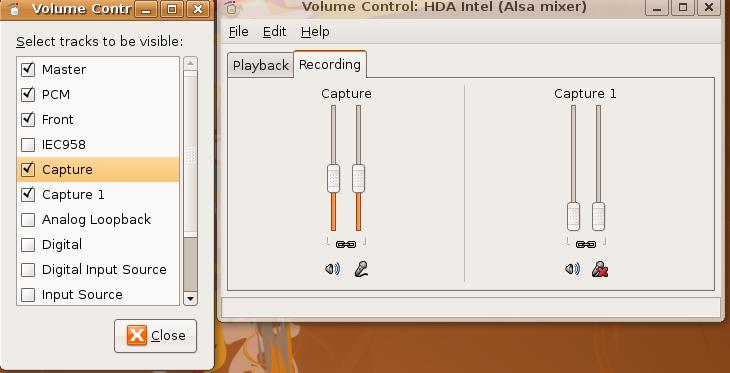
After installing esound, and restarting both skype and Ekiga, though I could hear Ringing, and Sound Outs from Skype, the mic was still not working in test call. Then after playing with the system for sometime I realised that the mic was muted. I had to enable mic boost control from Volumn Control->Edit->Preferences and tick Capture and Capture-1.


And then, when I un-muted the mic, skype worked flawlessly. And after skype, Ekiga also started working when I set Audio In and Audio Out devices to HDA Intel.


Interesting Part

Now, here is the interesting part. After playing around with skype and ekiga for a lot of time, I came to know that I had an uninterruptible process (elisa media player) parented by a python zombie process. I rebooted the system, since there is no other effective way to get rid of these zombies, and elisa was consuming 100% of my CPU2 (at least that's what the system monitor reported).

Ubuntu got stuck during reboot, I am not sure for what reason. So I had to power the system off. When I powered it back up again, I could login and there were no error messages related to pulseaudio. But the UI was totally unresponsive, as if it has hanged. iThen I switched back to command line mode using CTRL-ALT-F5, logged in, removed esound and reinstalled pulseaudio.

sudo apt-get remove esound
sudo apt-get install pulseaudio
sudo reboot


And after reboot, the UI was back to life again. So it was the pulseaudio which caused this freeze. Out of curiosity, I started Skype and made a test call. And to my surprise, both mic and audio playback worked!!! Now this was not expected, as skype initially refused to work with pulseaudio. So did ekiga.

I started the PulseAudio Session Management as well, still Skype and Ekiga worked perfectly.


Conclusion

It seems that, on Hardy, Skype and Ekiga, both work with pulseaudio, and it was probably due to  the zombie process of elisa media player hogging the sound device that caused problems with audio playback and mi, in Skype/Ekiga.

So finally, it seems that, on Ubuntu 8.04 Hardy Heron, you don't need to remove anything or install anything, to get Skype and Ekiga working!!! And this whole post of mine turns out to be a pure waste of time and energy!!!! :(


An Update -

Just in case somebody is interested, there is a very informative post about pulseaudio and how to get it working, on ubuntuforums.org - HOWTO: PulseAudio Fixes & System-wide Equalizer Support


Technorati Tags: , , , , ,

Sunday, March 1, 2009

Setting up Debian APT behind Proxy Server

Setting APT to run behind a proxy server is a pretty easy and quick procedure. Login as root user, and then All you need to do is set http_proxy environment variable in http://username:password@proxy.server.com:port_no/ format.

debian:~# export http_proxy='http://shreyas:myPassword@myproxyserver.co.in:8080/'
debian:~# echo $http_proxy
http://shreyas:myPassword@myproxyserver.co.in:8080/
debian:~# cat /etc/apt/sources.list
#
deb http://ftp.us.debian.org/debian/ etch main
debian:~# apt-get update
Err http://ftp.us.debian.org etch Release.gpg
Could not resolve myproxyserver.co.in
Ign http://ftp.us.debian.org etch Release
Ign http://ftp.us.debian.org etch/main Packages/DiffIndex
Err http://ftp.us.debian.org etch/main Packages
Could not resolve myproxyserver.co.in
Failed to fetch http://ftp.us.debian.org/debian/dists/etch/Release.gpg Could not resolve myproxyserver.co.in
Failed to fetch http://ftp.us.debian.org/debian/dists/etch/main/binary-i386/Packages.gz Could not resolve myproxyserver.co.in
Reading package lists... Done
E: Some index files failed to download, they have been ignored, or old ones used instead.
debian:~#

Here as the proxy server address is fictitious, apt reports an error. But that's not the point really. The point is, if you observe, what apt does with the http_proxy URL is, it separates out the host (in this case, myproxyserver.co.in) from the URL. And how does it do that? Simply by finding '@' sign in the http_proxy URL and then taking the part from '@' to ':'.

This is fine, but only as long as our password is plain alpha-numeric. The moment password contains a special character, like an '@', this whole thing goes for a toss.

debian:~# export http_proxy='http://shreyas:my@Password@myproxyserver.co.in:8080/'
debian:~# echo $http_proxy
http://shreyas:my@Password@myproxyserver.co.in:8080/
debian:~# apt-get update
Err http://ftp.us.debian.org etch Release.gpg
Could not resolve Password@myproxyserver.co.in
Ign http://ftp.us.debian.org etch Release
Ign http://ftp.us.debian.org etch/main Packages/DiffIndex
Err http://ftp.us.debian.org etch/main Packages
Could not resolve Password@myproxyserver.co.in
Failed to fetch http://ftp.us.debian.org/debian/dists/etch/Release.gpg Could not resolve Password@myproxyserver.co.in
Failed to fetch http://ftp.us.debian.org/debian/dists/etch/main/binary-i386/Packages.gz Could not resolve Password@myproxyserver.co.in
Reading package lists... Done
E: Some index files failed to download, they have been ignored, or old ones used instead.
debian:~#

Now if you observe, because of the '@' in password, apt thinks the username is 'shreyas', password is 'my' and the host is 'Password@myproxyserver.co.in'!! Try using escaping the '@' with a '\' and you will still get the same result.

This is the problem I had been facing since last couple of days. Few of the other guys have also reported this problem in other debian and ubuntu forums, and it's around for almost an year now. It has also been filed in Debian Bug Tracking System (BTS) as bug #500560.

Though this might seem as a rare occurrence, passwords with special characters are a norm in password policies of several organizations, as it is with mine. So I had no option but to either say goodbye to Debian, or fix it myself. And given the regard and love I have towards Debian, I had to at least have a go at fixing the bug. Saying goodbye to such a fantastic distro just because of this minor problem would have been very painful.

Bugfix for APT Bug #500560

And the bug is fixed! As I said, what APT used to do was to look for '@' and a ':' just after that to resolve the Host from http_proxy URL.

After the bugfix, now APT supports escape character '\' before '@'s and ':'s, formulates the correct password. For example, if your password contains an '@' character, all you need to do is prefix the '@' with a '\' while exporting the http_proxy environment variable.

debian:~# export http_proxy='http://shreyas:my\@Password@myproxyserver.co.in:8080/'
debian:~# echo $http_proxy
http://shreyas:my\@Password@myproxyserver.co.in:8080/
debian:~#

I have prepared this bugfix patches for both Lenny and Etch distributions. And they are available at my bugfix post.

For ready reference, here are the cross links to the patch files – 

  1. Debian Lenny - Bug #500560 Patch for APT v0.7.20.2

  2. Debian Etch - Bug #500560 Patch for APT v0.6.46.4.1

These patches have been tested on a Debian 'etch' 4.0 r4a distro running on a Dell Vostro 1500 latop (core 2 duo, 2GB).

Please report if you face any issues with the patches.


Sunday, February 1, 2009

Ter’RAFA’ic ….!!!!

Hard to digest this, very heart-breaking, in fact very very heart breaking; but you have to give it to the grit, fitness and most importantly, the finesse of this Spaniard. What a match!

I couldn't watch the 2008 French Open final, but I watched the 2008 Wimbledon final with my eyes wide open, and jaw hanging; wondering how the Mr Perfectionist could let this kid go past him. I didn't believe in Nadal being a better player than Federer. After all Federer was grace personified. He didn't have a powerful serve, but still he could produce aces time and again. He didn't have a very powerful fore-hand or a back-hand. But his back-hand passes, fore-hands flirted with the lines. They were so precise. It was not the power, but the finesse and precision that he had in his game, that always awed me. That's why even when Nadal was powering his game ahead with those booming forehands and power-packed shots, I never thought of him being in the same league as that of Federer.

In the 2008 Wimbledon final, though Nadal did play well, it was Federer's tally of unforced errors, and that very low percentage of those all important first-serve-ins helped Nadal's cause in a great way. If you cannot get your first serve in, then automatically you are stripped off of your ability to produce those aces and lose out on the ability to put your opponent on the backfoot, as the second serves are always the plan-b kind of safer serves, i.e. slower serves. Incidently, you end up dropping way too many of your serves. Secondly, when you keep committing those unforced errors, it's a free lunch for the opponent. You end up losing those crucial points which should essentially have been yours. And this was what was turning out to be the bane of Federer in that epic 2008 Wimbledon final. It was Federer sans his ruthlessness and precision in that match.

After that Wimbledon final, I kept thinking of Nadal's game as display of raw power and fitness rather than finesse. Not any more, after today's 2009 Australian Open final. What we saw today, was an exhibition of pure grit and awesome tennis from a 22 year old. He came into an Australian open final for the first time, and with a brutal 5+ hours of tennis played just a day ago. Federer with all his experience, with his form, and with a rest for two days, obviously came in as favourite. But even after these all odds, the way this golden-retriever tormented Federer with his ability of fetching even dead sure winners out of nowhere, and then producing an impeccable pass right under the nose of Federer at the net, was simply astounding to say the least. The whole time I was wishing and hoping and praying for Federer to win, but those extra-ordinary rallies and Nadal's unbelievable winners which would eventually end those rallies, just shocked and awed me to the hilt. They carried a hallmark of champion with a never-say-die attitude. It was not mere power, it was finesse and elegance written all over his shots. The very qualities that took Roger Federer where he stands today, or rather where he used to stand few months back.

This doesn't mean that Federer didn't play well. In fact, there were flashes of the old Federer with the supreme confidence and finesse and elegance during the start of the third set. He looked to be in control of the game, in control of the court during that time. But then again probably Nadal got into his head somehow, and those unforced errors started creeping in again. Getting into the head of a perfectionist champion, with a super impressive record of 13 Grand Slam championships, and then outperforming him in his own game, is something only a champion can do, I am convinced.

I guess, for this reason, this 2009 Australian Open final truly marks the end of an era of one champion, while one other intimidatingly fit, young champion gets ready to shake the scene, and shock-n-awe everybody.

Best wishes to Rafa from a heart-broken Federer fanboy.

Thursday, October 2, 2008

The Py-t(h)onic

Few weeks ago, out of sheer curiosity, I started to have a look at this new scripting-cum-object-oriented language capable of doing almost everything that C++ can do, and more. And I can't tell how mesmerized I am with this fantastic language. Thank god, I thought about giving Python a go. A whole new world has opened up for me. Because of the virtuosity of Python, now I am feeling very confident and capable of actually leveraging various ideas that I keep thinking about. Previously, with C++ it was a bit difficult because its core set of functionality is limited, and it's a pain to go searching for good third-party libraries for each and every aspect of desired functionality, may it be text processing, regexes, web-development, xml processing, or simply, connecting to - say - a mySQL database. Count the overhead of typing and thinking so much just for some small (maybe a PoC) snippet, and you subtly lose the all-important enthu to get it going.

With Python, it all becomes very much palpable. The language itself comes with tones of important 'batteries' of functionality, already included. You can do almost everything conceivable with Python, in a very small amount of time, and that too in a concise and goody-goody way in all aspects. Because of this, you tend to spend almost all your time on solutioning, rather than wasting it in that unnecessary wrestling-with-finer-aspects of the base language. If you are a C++ programmer, and have developed a huge liking for the language (like I have), and hence are adamant enough to even think about any other language (like I was), I would strongly recommend you to spend some time with Python. You won't regret it.

Here I don't intend to project Python as an alternative for C++ (haah!) as there will always remain a performance penalty in an interpreted language as compared to a compiled language (which happens to be closer to the system). But it also depends upon how many of our ideas are actually performance-centric. If you think a little performance gain (think quad-core) can be squandered in favor of an impressive line-up of features, Python is for you. Few of the features offered by Python are – very clean syntax, loads of functionality already included in the language, strong support for OOP paradigm, better portability. Python offers an all-in-one development platform which can be used to develop everything right from the lower-level database persistence mechanism to the web-based GUI. All this, in a very graceful way. That's one of its biggest advantages.

As you might already be aware, the new C++0x standard is coming up with a host of 'new' features for C++, like lambda functions, tuples, regex processing, multi-threading support etc. But if one has to compare, for Python, this is not new at all, it is already present in there, and is very easy to put to work. That is again one more advantage in using Python – no overhead involved for using heavy-duty functionality, with minimal error handling requirement. For example, if you want to use a dictionary in Python, all you have to do is –

Mydict = {<key1>:<value1>, <key2>:<value2>}

That's it. As simple as that. Now you can access the dictionary like a dynamic array in C/C++.

What is more, you can pack the punch in you code in a very concise manner, by clubbing a lot of functionality together. Take a look at following code –

While most of the code is easy to read and understand, for those finding it difficult to understand, let me state my intention behind writing this small snippet of code. Generally, in the unix world, most of the utilities expose their (powerful) functionality through command-line-arguments. Hence, processing these command-line-arguments is one of the most basic requirements, we can say, for a unix utility. Now neither C nor C++ offer any help in getting this done quickly. So what entails this requirement, is the head-ache of string processing, multilevel switches, and a lot of error handling. If you have worked in such a situation before, I am sure, you would empathize with me.

Now in that context, have a look at the python code snippet above. The program defines couple of functions to handle different command line args. Then it defines a dictionary with the command-line-arg and its corresponding handler as the key-value pair. After that, there is no switch, no string processing, nothing. All it does is, pass the 1st argument as a key to the dictionary, get the corresponding handler function, and call it. If required, pass on the remaining command-line-args (if any) to the handler function. All of this in one single statement! It is not only quick, it is elegant too, as you can see. If you come back to your code even after few months, you won't get lost in the quagmire of huge amount code that has very little to do with the actual intention of writing that program.

It is this utter simplicity and elegance offered by Python, that hooks you to this language.

I can tell you about one practical example at my workplace, where I could leverage Python to do an important job of analyzing a log file, very effectively, and that too very quickly.

I wanted to analyze a log file, generated by a time-profiler class which I had written to keep a watch on performance gain achieved through various tuning activities. The time-profiler utility logged method-name, number of records processed and the time taken for it all. Now since the number of calls were in the range of around 40K, visual analysis was not on the cards. So I had to write an utility which would find out the first five calls taking maximum amount of time and corresponding number of records processed, for a given method-name.

For this, I required to process the command line to understand which method is to be analyzed. Then I needed to read the log file, find out all the logs from the logfile which correspond to the given method-name and store the records-processed and time-taken figures with a one-to-one relationship. After that, one sort operation would be required to get the first five records, with maximum time-taken figures. After this sort, the one-to-one relation between the number-of-records-processed and time-taken shouldn't be lost at any cost.

Had I have implemented this in C++, I would have wasted a lot of time in writing a lot of code dealing with the nitty-gritty's of above mentioned things. Instead, I decided to give Python a try, even though I wasn't very much familiar with Python back then.

I came up with a working utility in almost half an hour doing everything mentioned above!!!

This became possible because, as I have been stating again and again, Python offers an impressive set of inbuilt functions and modules, which can effectively do away with the need to spend time on the basic needs. For example, I needn't spend much time on things like –

  1. Processing the command-line
  2. File reading and string processing to find out which lines belong to given method name
  3. Storing the time-taken and number-of-records-processed as key-value pairs in a dictionary (didn't require any STL manipulation overheads)
  4. Sorting the keys (time-taken) in descending order (didn't require any operator overloading)
  5. A LOT of error handling at every stage

Everything was intuitive and hence I was able to find out references for desired functionality, very quickly. I didn't need to spend a lot of time into reading the manuals to find the right method for the job, then check for type-compatibility (due to dynamic typing, another 'controversial' feature of Python) etc etc

That was when I realized, how productive one can get with this powerful language. Allowing the user to focus on the solution, rather than the underlying language, is the most celebrated feature of Python. And I would strongly suggest you taste (and test) it once.